New email course: 100-Word Writing Habit
 One of the best things I’ve done for myself was start a writing habit. I used to wait for inspiration. Months would pass between blog posts. keep on reading »

David Kadavy is author of Mind Management, Not Time Management, The Heart to Start & Design for Hackers.
One of the best things I’ve done for myself was start a writing habit. I used to wait for inspiration. Months would pass between blog posts. keep on reading »
TL;DR: Buy Mind Management, Not Time Management right now »
It’s surreal. Ten years ago I started writing my first book. That was when I ran into a problem. keep on reading »
 Have you been putting off a creative dream? Maybe it’s a novel or an album or a business.
Or maybe you have this burning feeling that you have something to offer the world, but you aren’t yet sure what it is.
I’m launching a new email course. Summer of Starting is a series of journal prompts designed to help you stop procrastinating, and start creating. keep on reading »
You may have noticed that Google Calendar has been adding new features lately. You can find time for your goals, and set reminders, for example. I played a very small part in these features, but I learned a lot about my own productivity in the process.
The email seemed as urgent as it was hastily written.
Subject: “IMMEDIATE Action Reqeusted [sic]”
Attached to the email was [redacted], [redacted], and another [redacted]. keep on reading »
UPDATE (8/31/2015): I loved the form factor so much, I upgraded to an Alphasmart NEO, which has a much nicer keyboard feel, and (regrettably) displays slightly more type 😉
Technology has made a lot of things about writing easier. You can save little scraps of information in Evernote, write and edit with ease, and you don’t have to go to the library to do research. keep on reading »
Productivity is all about mind management, not time management. If you want to be really effective at what you do best, it really helps to offload as many as unimportant details as you can. I’ve struggled with delegation, while watching my friends scale their impact, and their businesses, thanks to their delegation skills. In this Fancy Hands review, I’ll show you how Fancy Hands helps me scale my business with limited hassle. keep on reading »
It seems like everyone wants to have more time. In a recent open-ended survey of folks on my email list, time was the second most talked about thing. keep on reading »
UPDATE, December 9, 2020: My UltraErgo had a nice life, but since it’s discontinued, I couldn’t replace it. I’m currently enjoying my Mistel BAROCCO MD770, with Cherry MX switches. (I went with the extra-clicky blue.)
UPDATE, September 2, 2017: For the past couple of years, I’ve had readers asking if there’s an alternative to the UltraErgo Wireless Split Keyboard that I now love. Apparently it’s discontinued. The answer is still that I know of no better “truly split” alternative than the Kinesis. Happy to hear other suggestions in the comments.
UPDATE, March 10, 2016: A few months ago, I switched to the UltraErgo Wireless Split Keyboard (thanks to commenters stcorbett and cfc).
Here’s the UltraErgo (left, with its tiny USB dongle), next to the Kinesis (right).
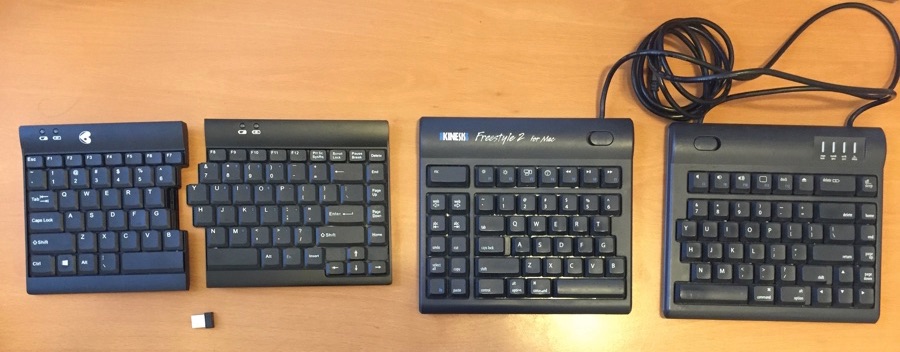
The UltraErgo is objectively better than the Kinesis Freestyle2 on nearly every dimension that matters to me.
The UltraErgo is not without compromises, though. A few potential “cons:”
Since portability is a huge factor for me, this keyboard is a clear winner for me, but if you’d prefer a keyboard built for a Mac, you may prefer the Kinesis.
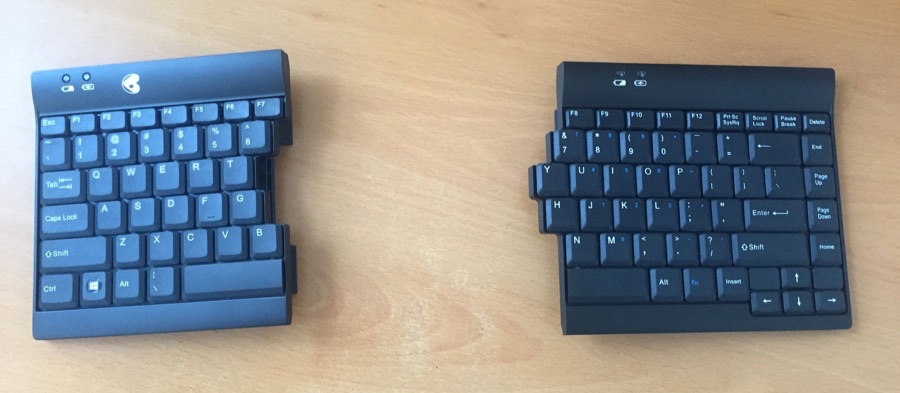
Here is the UltraErgo as I use it. There are two “slant” settings, and I prefer it on the lowest one. Notice that there are “battery” indicators on the UltraErgo. The keyboard comes with a mini-USB (?) cable for charging (?) the keyboard. I never had to use this, but I did it anyway, and that was months ago. The keyboard came with no instructions nor manual.
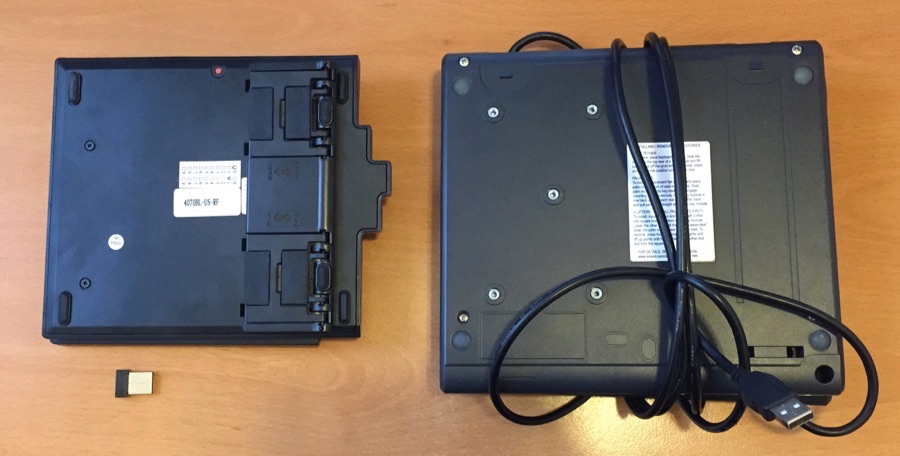
Here is the UltraErgo ready to be put in my backpack (I just keep the tiny dongle in my USB port), next to my Kinesis. You can see the flaps that deploy to slant the UltraErgo. The difference in size and weight is night-and-day in a backpack.
Now, back to the original post:
Standing desks are everywhere these days. More and more office workers are switching over to standing desks, to prevent the health problems associated with sitting. keep on reading »
Productivity is less about time management than it is about mind management. Sometimes you can get a ton of stuff done in a 10-minute burst, while other times you may be totally distracted and unproductive all day long. keep on reading »